Skip to content
LegantisDigital Service Free quote
Case study · Education

Ostad, a learning platform for teachers and their students

Ostad (“teacher” in Arabic) is the learning platform we publish: teachers create their classes, publish lessons and homework, grade, mark and take attendance; students know what to do next; a parent or guardian can follow their child. It is live on the web, in French, Arabic and English. This page describes what it contains and how it is built.

  • Free
  • No obligation
  • Reply within 2 business days
  • Education
  • Web
  • Teachers
  • Students
  • Parents
  • French, Arabic, English
01Starting point

A whole class, not a folder of files.

Ostad started from an idea written down at the very beginning of the project: a learning platform should not be just a place to store PDFs.

An audience

Teachers, independent or in a school, their students and, if the student decides so, a parent or guardian.

A need

Preparing, handing out, grading, following up and communicating: a week of teaching, gathered in one place.

A question

“What should I do now?”: the home screen of every student and every teacher answers it.

02Objectives

What the platform had to make possible.

Save teachers time

A library of reusable lessons, automatically graded exercises, a gradebook that computes averages: fewer tasks redone from one class to the next.

Give students a clear path

Access with a code, a home screen listing homework and deadlines, interactive exercises and a view of their progress.

Involve families without opening the class

The parent or guardian sees marks, attendance and published report cards, read-only; they never read messages or drafts.

Three languages from the start

The whole interface exists in French, Arabic and English, with a genuine right-to-left layout.

03What Ostad contains

Classes, lessons, follow-up.

The essentials of the platform, all live on the web.

  1. Classes joined with a code

    The teacher creates a class and shares a six-character code, or a link; students enter it to join. The code can be changed or turned off, and a school can hand out a group code.

    • Class code
    • Invitation link
  2. Lessons, homework, exercises

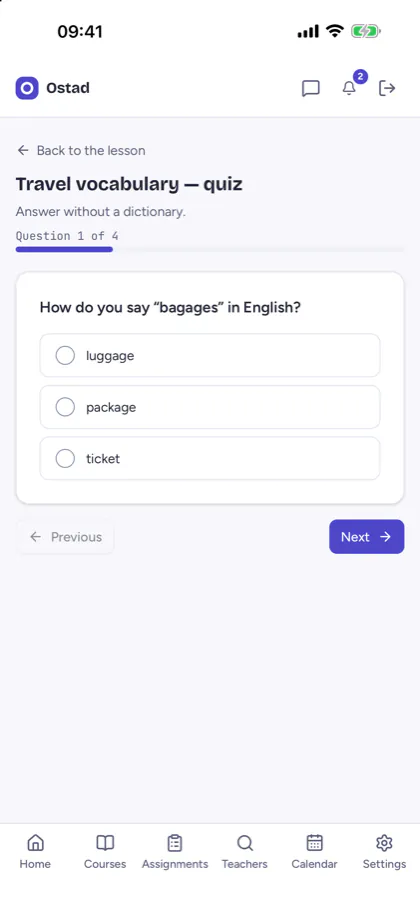
    Chapters and lessons (text, PDF, image, video, audio, link, vocabulary), published right away or on a chosen date. Homework with a private draft, submission, mark and comment. Multiple-choice, true-or-false, fill-in-the-blank or open-ended exercises; mistakes on automatically graded questions come back for review the next day, then after three and seven days.

    • Lessons
    • Homework
    • Exercises
    • Reviews
  3. Marks, attendance, report cards

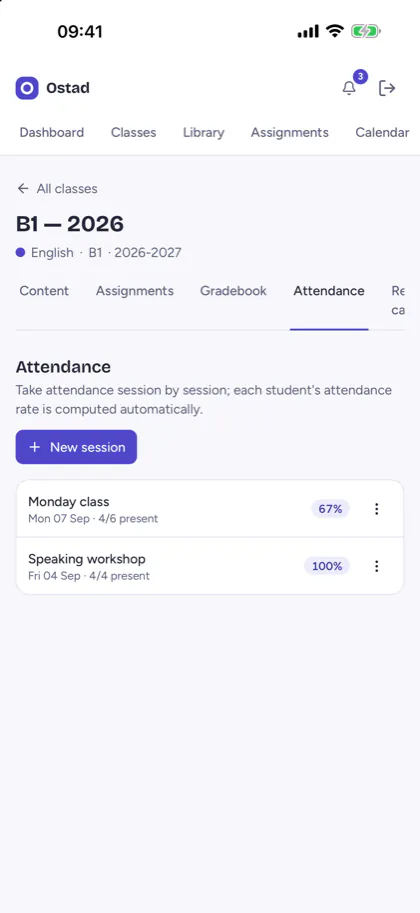
    A gradebook with scales and weightings, averages out of 20 and spreadsheet export; attendance taken session by session, with the attendance rate computed; report cards per term with comments, published on screen.

    • Gradebook
    • Attendance
    • Report cards
  4. Communicate and stay organised

    A class feed and announcements that update without reloading the page, messaging between teacher and student, in-app notifications, a calendar that exports to the phone's diary, and a link to a Meet or Zoom room for live classes.

    • Class feed
    • Messaging
    • Calendar
04User journeys

A space for each role.

Everyone sees what concerns them, and only that: these limits are enforced by the database, not just by the screen.

The teacher

Creates classes, publishes lessons and homework, grades, marks, takes attendance and publishes report cards, from a dashboard that starts with what is left to do. Teachers can also present their offer in the public directory of independent teachers and receive lesson requests.

The student

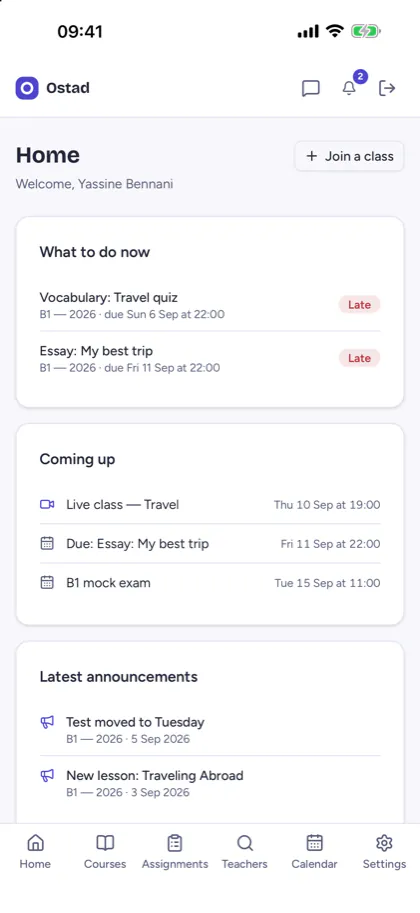
Joins the class with a code. The home screen lists what to do now, the next deadlines and the latest announcements; the student does exercises, hands in homework and follows their progress.

The parent or guardian

Is linked by a single-use code generated by the student, valid for 72 hours. They see their children's marks, attendance, homework and published report cards, read-only, never their messages; the student can remove this access.

The school

A teacher in charge organises classes, subjects and terms, and supervises read-only: they change neither marks nor report cards, and do not read private messages.

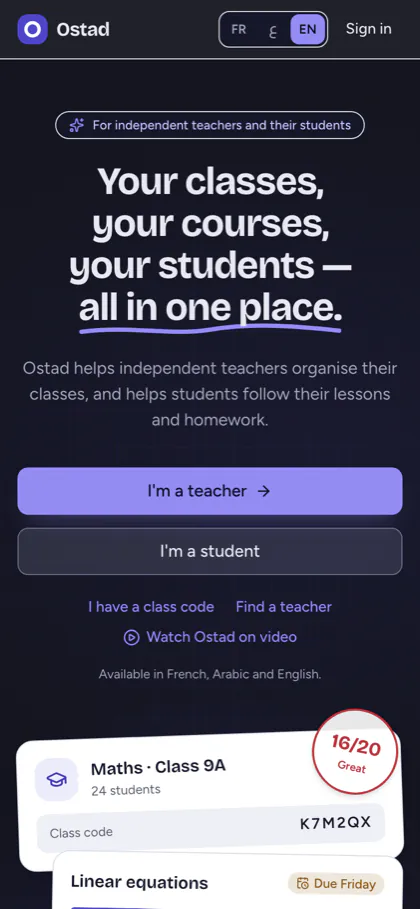
Screenshot of Ostad's public home page on a phone: “Your classes, your courses, your students — all in one place”

The public home page, as live on 26/10/2026 (the class preview at the bottom is illustrative).

Screenshot of a student's home screen in Ostad: what to do now, coming up, latest announcements

The student's home screen: what to do now, then the next deadlines.

Screenshot of a multiple-choice exercise in Ostad

A multiple-choice exercise, graded automatically.

Screenshot of a class attendance sheet in Ostad, with the attendance rate of each session

Attendance, session by session, on the teacher's side.

Real screens. Apart from the home page: Ostad's demo mode, version of 11/10/2026; names, classes and dates are fictitious.

05Technical choices

How Ostad is built.

Permissions in the database

Access rules at database level: a student reads neither the marks, nor the attendance, nor the work of a classmate, and a parent only sees the children who linked them. Automated tests check, role by role, what must stay out of reach.

Grading on the server

Exercise questions reach the screen without their answers; grading happens on the server, then the teacher's explanation is shown.

The technical building blocks

An interface in React and TypeScript; Supabase for the Postgres database, authentication, file storage and the real-time class feed, messages and notifications.

One code base, three platforms

The same application serves the web and the iPhone and Android versions, built with Capacitor: a single code base to maintain.

French, Arabic, English

The complete interface exists in all three languages, with a genuine right-to-left layout in Arabic: page layout, direction icons and font adapted.

No trackers

No analytics and no ads. Anyone can export their data or delete their account from the application.
Build a similar app
  • Free
  • No obligation
  • Reply within 2 business days
06Today

Where Ostad stands.

The web platform is live: teacher, student, parent and school spaces, and the teacher directory. The iPhone and Android apps are built from the same code, but not yet published. Ostad is at launch stage: we publish no usage figures.

Its limits, to date: no offline mode and no phone notifications; live classes go through a Meet or Zoom link; report cards are viewed on screen, without PDF export, and do not replace an official report card.

Education
Ostad app icon

Ostad

Classes, homework and student progress

Screenshot of Ostad on a phone: a multiple-choice exercise

Classes joined with a code, lessons, homework, graded exercises, marks, attendance and report cards, with read-only access for parents or guardians.

Field
Education: classes, homework, exercises and student progress
Platforms
Web (live) · iPhone and Android in preparation
Languages
French, Arabic (right to left), English
07Contact

Tell us aboutyour project.

A similar platform to build? Describe your needs in a few lines: we reply within two business days, and the quote is free.

Quote
Get a free quote
  • Free
  • No obligation
  • Reply within 2 business days
Mail
Oasis Offices Latitudes, Route de l'Oasis, Bureau 304, Maarif, Casablanca, Morocco